MGM Rewards
- 4.1
- Rating
- 1.00M
- Installs
- Free
- Price

 Analysis by App-foxy
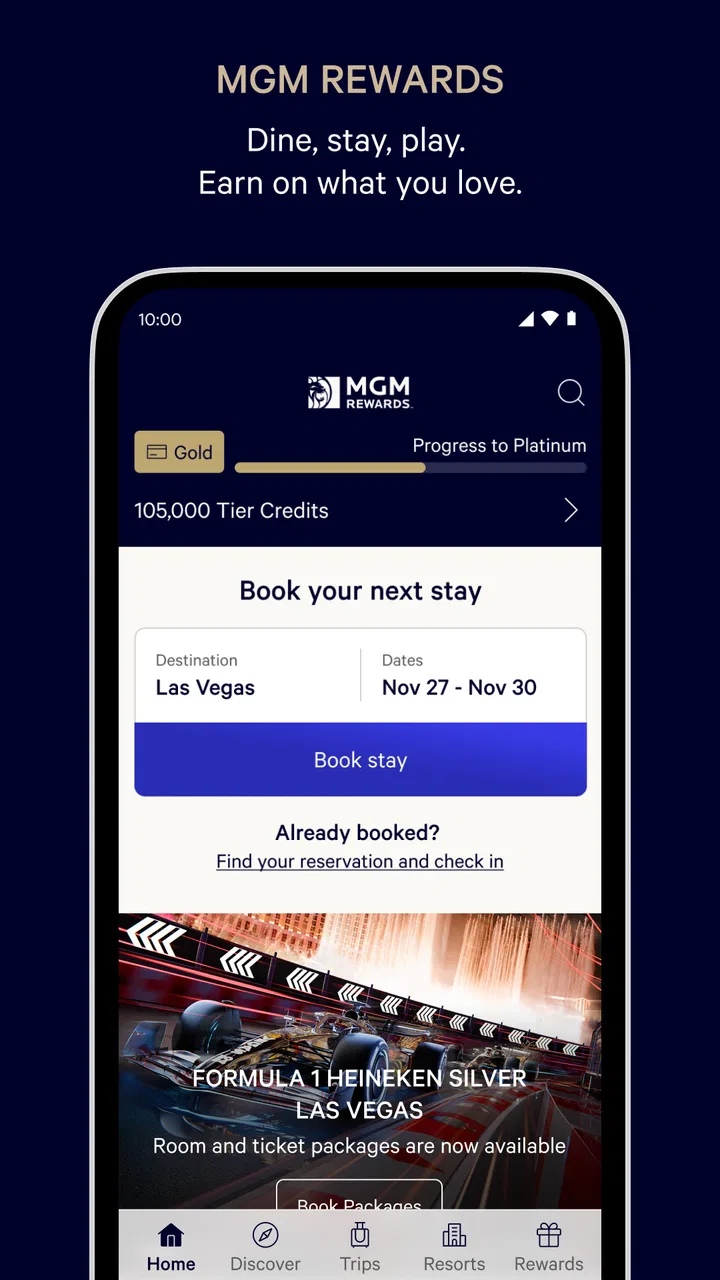
I approached MGM Rewards as a practical travel companion rather than a casino-only app. That distinction matters. It is a free Travel & Local app from MGM Resorts International, aimed at people who stay, visit, dine, or spend time at MGM destinations and want those activities organized around one account. The app’s central promise is simple: make it easier to manage a visit while keeping track of rewards activity.
In everyday use, I found the value depends heavily on how often you interact with MGM Resorts. If you are planning a stay, checking arrangements before arriving, or trying to keep your rewards activity in one place, the app can reduce the need to jump between mobile pages, emails, and printed details. If you rarely visit an MGM property, it is much harder to justify keeping it as a regular travel tool.
The app has been available since October 29, 2015, and its current version is 26.10.1. It is rated for Everyone, costs nothing to download, and runs on operating systems from version 10 onward. Its average rating is 4.2 from around 31 thousand ratings, with roughly 5.3 thousand written reviews and over a million installs. Those figures suggest a well-established app, although a popular rewards app can still feel useful only when its features match the way you travel.
You May Also Like

 Blood Strike: 2.5 Anniversary
Blood Strike’s Loadouts Turn Every Drop Into a Tactical Gamble
A close look at Blood Strike’s custom loadouts: how fast access to signature weapons reshapes its battle royale rhythm, rewards preparation, and narrows the gap between fights.

 Pandora - Music & Podcasts
Pandora’s Music Is Easy to Start, but Harder to Recover
Pandora’s strength is its low-effort path from a seed to a station. Its weak spot is how much confidence it asks you to place in connection, setup, and quiet recovery.

 8 Ball Pool
 Is Built on Rivalries, Rematches, and Routine
A close look at the rivalries, rematches, shared routines, and unanswered safety questions that turn a quick pool match into a persistent mobile community.

 Samsung Music
’s Quiet Strength Is Playing What You Already Own
Its reach comes less from spectacle than from dependable access to a personal library. That simplicity is both the app’s strongest retention engine and its ceiling.

 AccuWeather: Weather Radar
AccuWeather Review: A Quick, Clear Forecast for Everyday Decisions
For everyday plans, the best forecast is the one you can understand quickly. AccuWeather makes rain timing, radar, and local conditions easy to act on, with a few trade-offs.

 Hill Climb Racing
Why Hill Climb Racing Still Turns Crashes Into One More Run
A tiny car, a bumpy hill and one more upgrade: Hill Climb Racing keeps resurfacing because its simple chaos makes every near-miss feel personal.
More From Our News Desk



How I would use it before, during, and after an MGM visit
I’d treat MGM Rewards as part of a simple trip routine, not as the place to manage every travel detail. Before a visit, I’d check the account and the information tied to the MGM plans; while there, I’d use it as a reference point; afterward, I’d review the account while the trip is still fresh. That sequence also makes it easier to spot when a question needs help from the resort rather than another app check.
Start with one clear travel task
The most reliable way to use MGM Rewards is to begin with a specific purpose. I would not open it casually and expect it to replace every travel app on my phone. Instead, I would use it before a trip to review the details connected with an MGM visit, then return to it when I need to manage the resort side of that trip.
That approach keeps the app focused. A general travel app may be better for comparing airlines, building a multi-city itinerary, storing independent hotel bookings, or combining several brands. MGM Rewards makes more sense when the destination itself is part of the plan and you want the MGM relationship to remain visible throughout the visit.
For example, imagine I am arranging a weekend in Las Vegas and already know that I want to stay at an MGM property. I would use a general booking or travel service to compare the wider trip if necessary, but I would use MGM Rewards for the parts tied to MGM Resorts. Before leaving home, I would open the app, check the information associated with my visit, and make sure I understand where my rewards activity belongs. That small separation prevents the common mistake of treating one app as the source for every travel detail.
Use it as a visit companion, not just a booking screen
The useful habit is to return at different stages rather than opening the app once and forgetting it. Before arrival, it can serve as a preparation tool. During the visit, it can help keep resort-related information close at hand. Afterward, it becomes a place to review the result of the trip and maintain awareness of rewards activity.
I especially like this staged workflow because rewards programs are easy to ignore until a person wants to use something they have accumulated. Checking after a visit makes the experience more concrete. It also gives me a chance to notice whether an activity has been recorded as expected instead of waiting until a future trip, when the details may be harder to remember.
There is a practical trade-off here. The app can organize the MGM portion of a trip, but it does not remove the need for ordinary travel preparation. I would still keep confirmation details, transportation plans, and non-MGM reservations available through the tools that created them. The best workflow is not “use one app for everything”; it is “use this app for the MGM relationship and use other tools for the rest.”
Keep expectations realistic around rewards
The word “rewards” can make people expect instant savings or a complete financial dashboard. I found it more helpful to think of the app as a way to stay connected to the program’s activity and benefits, not as a guarantee that every visit will produce a dramatic payoff.
Experienced users usually get more from a rewards app by checking the account before making decisions. I would look at the available information before booking, spending, or planning a return visit, then compare that with the actual value of the trip. A benefit that sounds attractive may not outweigh a higher room cost, extra travel, or spending that I would not otherwise make.
The strongest habit is to let the app support a trip you already want, rather than letting rewards pressure you into spending more. That is particularly important with a resort-focused program, where entertainment, dining, lodging, and other activities can make a visit expand quickly.
Settings and account details worth checking
I would begin by making sure the account information is accurate and consistent with the details used for a reservation or visit. A rewards app is only useful when activity can be associated with the right person. Small mismatches in names, account details, or the way a booking is connected can create unnecessary confusion later.
I would also review the app’s notification choices instead of accepting every alert without thinking. Travel reminders can be helpful when I am actively planning a visit, but constant promotional messages can make important information harder to notice. My preference would be to keep alerts that support an upcoming trip and reduce anything that feels unrelated to my current plans.
Another worthwhile check is the app’s access while traveling. I would sign in and review important information before leaving home rather than assuming that a strong connection will always be available at a resort. This is not a claim that every screen works offline; it is simply a sensible travel habit. If I expect to need something, I would open it in advance and keep the relevant details accessible through the app’s normal presentation.
Privacy is also part of the settings discussion. I would read the available account and notification controls with the same care I use for any loyalty program. Rewards apps are designed around personal activity, so I would only enable the access and communications that make sense for my visit. The goal is a useful account, not a phone filled with alerts I never act on.
Make the app easier to use repeatedly
The fastest workflow is built around repetition. If I visit MGM destinations regularly, I would place the app where it is easy to reach and make a habit of checking it at three moments: before booking, before arrival, and after the visit. That is more effective than opening it randomly and searching through it when I am already tired or distracted.
I would also avoid waiting until the front desk, restaurant, or entertainment venue to figure out how the app fits into the visit. A few minutes of preparation can make the experience calmer. I can identify the account I intend to use, review the trip information already available, and decide what I need to verify in person.
For repeat visitors, the key shortcut is not a hidden button; it is a repeatable checklist. I would confirm the account, review the upcoming visit, check the rewards information, and then keep the app available during the trip. Afterward, I would review the account again. This routine reduces the chance that I will overlook a useful update or forget what happened during a busy weekend.
Where it compares well with ordinary travel alternatives
Compared with a general travel organizer, MGM Rewards has a narrower focus and can feel more relevant when the entire visit revolves around MGM Resorts. A broad itinerary app may show flights, independent hotels, restaurant bookings, and sightseeing in one timeline, but it may not present MGM-related rewards activity with the same emphasis.
Compared with relying on email alone, the app offers a more deliberate place to return to. Email is excellent for receiving confirmations, but it can become difficult to search when several trips, promotions, and unrelated messages are mixed together. An app built around the resort relationship is easier to make part of a regular pre-trip routine.
On the other hand, a general travel app remains the better choice for a trip that includes many hotel groups or several destinations. I would not expect MGM Rewards to replace a complete itinerary manager. Its advantage is depth within the MGM ecosystem, not breadth across the entire travel industry.
There is also a difference between a rewards app and a simple digital wallet. A wallet is convenient for storing passes or payment-related items, but it does not necessarily help me understand the wider relationship behind a resort visit. MGM Rewards is more useful when I want the account, visit planning, and rewards side of the experience considered together.
Realistic ways to get more value without overcomplicating things
One useful scenario is a traveler who visits an MGM property several times a year but does not remember the details of each stay. Instead of trying to reconstruct everything from old emails, I would use the app as the first place to review the account before planning the next visit. That creates a simple feedback loop: check what is available, decide whether it affects the trip, and then review the account afterward.
A second scenario is a couple sharing a weekend plan. I would decide in advance which person is managing the MGM account and make sure the booking and activity are handled consistently. This avoids the awkward situation where each person assumes the other person’s account will receive the relevant credit or information.
A third scenario involves a traveler who is tempted by a reward but has not yet chosen a destination. I would use the app to understand what is available, then compare the total cost and convenience of the trip with the alternative of simply choosing the best-value hotel or activity. Rewards should influence a decision only when the underlying trip already makes sense.
These workflows are more valuable than repeatedly browsing the same screens. The app works best when it becomes part of a decision process: prepare, verify, use, and review. That is the difference between having a loyalty app installed and actually managing a loyalty account well.
Limits that experienced users should understand
The app’s biggest limitation is its specialization. If I am not staying at, visiting, or considering an MGM destination, there may be little reason to open it. A general hotel app can be more useful for comparing properties across different companies, while a general travel planner can handle a broader itinerary.
Another limitation is that a digital account cannot resolve every real-world question. If a reservation detail looks wrong, a reward does not appear as expected, or a property-specific rule needs clarification, I would treat the app as a starting point and contact the appropriate MGM support or on-site team. The app can surface account information, but it is not a substitute for human assistance in every exception.
I would also avoid assuming that every reward has the same value or flexibility. Programs change in practical usefulness depending on the trip, the property, the timing, and what I would have spent anyway. The app can make the account easier to follow, but it cannot turn an expensive visit into a bargain automatically.
There is a behavioral limit too. The convenience of having rewards visible can encourage unnecessary spending. I would set a personal budget before arriving and treat the rewards as a possible benefit, not as permission to exceed it. That is a more reliable way to keep the app helpful rather than letting it shape the entire trip.
Who should install it, and who should skip it
I would recommend MGM Rewards to regular MGM guests, travelers preparing for an MGM stay, and people who want a central view of their relationship with MGM Resorts International. It is also a sensible choice for anyone who dislikes digging through old messages whenever a trip approaches.
I would be more cautious if I were a one-time visitor with no interest in returning. In that case, the setup and account maintenance may offer limited long-term value. Someone comparing hotels from many brands should also start with a broader travel tool and add MGM Rewards only if an MGM property becomes part of the plan.
The Everyone age rating makes the app broadly accessible, but that does not mean every part of a resort visit is suitable for every traveler. I would still consider the nature of the destination and the activities being planned separately from the app’s age classification.
My final take after using it as a travel routine
MGM Rewards is most convincing when I use it with discipline. I would not describe it as a universal travel organizer, and I would not install it solely because rewards sound appealing. Its real strength is giving MGM-focused travelers a repeatable way to prepare for visits, keep account activity in view, and return to the same information after a stay.
The free price removes the main barrier to trying it, and its long availability, current version 26.10.1, and substantial install base show that it is an established part of the MGM digital experience. Still, popularity does not change the central question: will I visit MGM destinations often enough to make the app part of my routine?
For me, the answer is yes when an MGM trip is already planned. I would check the account before committing money, review the visit details before arrival, keep notifications under control, and verify the outcome afterward. Those habits make the app more useful than a quick download followed by occasional browsing.
My recommendation is straightforward: install it if MGM Resorts is a regular or upcoming part of your travel plans, but keep a general travel app for everything outside that ecosystem. Used that way, MGM Rewards feels focused rather than limited, and its rewards features become a practical companion to a trip instead of the reason to spend more than planned.
FAQs for MGM Rewards
01What is MGM Rewards and how does it work?
MGM Rewards is a loyalty program offered by MGM Resorts that allows users to earn points through various activities, such as staying at MGM properties, dining, and gaming. These points can be redeemed for perks like free stays, dining discounts, and exclusive experiences. The app provides a convenient way to track your points and access rewards.
02Is the MGM Rewards app free to use?
Yes, the MGM Rewards app is free to download and use. However, to earn points and access certain rewards, you may need to make purchases or reservations at MGM Resorts properties. The app itself does not require any fees, making it a cost-effective tool for managing your loyalty program activities.
03What platforms is the MGM Rewards app available on?
The MGM Rewards app is available for both Android and iOS devices. You can download it from the Google Play Store for Android or the Apple App Store for iOS. Ensure your device meets the minimum system requirements for a smooth experience with the app's features and updates.
04How can I maximize my points with MGM Rewards?
To maximize your MGM Rewards points, engage in activities such as staying at MGM properties, dining at MGM-owned restaurants, and participating in eligible gaming activities. Regularly check the app for promotions and bonus point opportunities. Planning your stays around these promotions can significantly increase your point earnings.
05What should I do if I encounter issues with the app?
If you experience issues with the MGM Rewards app, start by checking for updates in your app store, as updates can resolve bugs. If the problem persists, contact MGM Resorts customer service through the app or their official website. They provide support to help resolve technical difficulties efficiently.
Pros
- Easy-to-use interface with intuitive navigation.
- Offers exclusive member-only discounts.
- Integrates well with existing MGM accounts.
- Provides real-time updates on rewards status.
- Comprehensive hotel and event booking options.
Cons
- Requires stable internet connection to function.
- Limited customer support options available.
- Some features locked behind higher tiers.
- Occasional app crashes reported by users.
- Location services required for full functionality.

MGM Rewards
Gallery